
We’ve all been there—you love the smooth experience of your iPhone, but there’s that one specific Android app, retro game, or open-source utility that you just can’t find on the Apple App Store. The good news is that the “walled garden” of iOS is getting easier to climb. You don’t need to trade in your device to run your favorite Android-exclusive software.
Preview: In this guide, I’ll show you the only working methods to run Android apps on iPhone in 2025, ranging from simple Safari-based tricks to advanced emulators to run Android apps on iPhone.
The Truth: Can You Install APK Files on iOS?
Before we dive into the “how-to,” we need to address the elephant in the room. If you’ve seen YouTube videos promising a “magic injector” that installs .APK files directly onto your iPhone just by visiting a website—stop.
As a tech specialist who has tested dozens of these claims, I can tell you that 99% of them are “CPA scams” designed to make you download unrelated apps. iOS and Android speak different languages (Swift vs. Java/Kotlin). You cannot natively “install” an Android package on an iPhone.
However, you can emulate the Android environment or use Progressive Web Apps (PWAs) to achieve the same result. Here is how.
Method 1: The “Safari Method” (Best for Web-Based Apps)
Many users asking “how to download Android apps on iPhone using Safari” are actually looking for Progressive Web Apps (PWAs). Many modern Android apps have web versions that function exactly like the app when added to your home screen.
How to do it:
- Open Safari on your iPhone.
- Navigate to the web version of the app you want to use (e.g., Xbox Cloud Gaming, GeForce Now, or a specific indie game tool).
- Tap the Share Icon (the square with an arrow pointing up) at the bottom center.
- Scroll down and select “Add to Home Screen.”
- Name the app and tap Add.
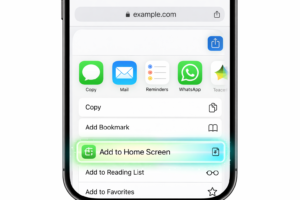
Why this works: This creates a standalone icon on your home screen. When opened, it hides the Safari URL bar, making it look and feel exactly like a native app. This is the safest method and requires zero technical skill.
Pro Tip: If you are trying to play browser-based indie games, check our official download guide to see if a web-optimized version is available for your device.
Method 2: Cloud-Based Emulators (No Installation Required)
If you need to run a full Android interface to test an app, cloud emulators are your best bet. These services run a virtual Android phone on a server and stream the video to your iPhone.
Top Pick: Appetize.io or Redfinger
These platforms are designed for developers but work for savvy users who need to access a specific Android interface.
- Open Safari and visit Appetize.io.
- Upload the
.APKfile you want to use (or use their demo mode). - The site will load a virtual Android phone inside your browser window.
- You can interact with it using touch controls just like a real device.
Pros: No risk of viruses; works instantly.
Cons: Free plans often have time limits; requires a strong internet connection.
Method 3: Using an Emulator to Run Android Apps on iPhone (Advanced)
Keywords targeted: emulator to run android apps on iphone
For those willing to tinker, you can use proper emulation software. Note that Apple does not allow these on the App Store, so you will need to “sideload” them.
Option A: UTM SE (The Virtual Machine Route)
UTM SE is a powerful emulator that can run Linux and older versions of Android (x86) right on your iOS device.
- Step 1: Download AltStore to your computer and install it on your iPhone.
- Step 2: Download the UTM SE IPA file.
- Step 3: Use AltStore to install UTM SE.
- Step 4: Create a new Virtual Machine inside UTM and install an Android x86 ISO.
Warning: This is resource-intensive. Newer iPhones (iPhone 13 and up) handle this decently, but older models may struggle with lag.
Option B: iAndroid (Legacy)
You may hear about “iAndroid” on forums. While legendary, this tool hasn’t been updated for modern iOS versions effectively. Stick to UTM or TouchHLE (for games) for a more stable experience.
Comparison: Which Method is Right for You?
| Feature | Safari (PWA) Method | Cloud Emulator | Sideloaded VM (UTM) |
| Difficulty | Easy | Medium | Hard |
| Performance | High (Native speed) | Medium (Dependent on WiFi) | Low (Resource heavy) |
| Cost | Free | Free/Paid | Free |
| Best For | Streaming apps, Utilities | Testing APKs quickly | Tech enthusiasts |
Safety First: Avoiding “Profile” Scams
If a website asks you to download a “Configuration Profile” to run Android apps, decline it. Malicious profiles can hijack your browser settings or steal data.
Always verify the source. For trusted indie projects and games, always verify you are on the correct domain. For example, if you are looking for specific game assets or community content, check our gallery page to ensure you are viewing official, safe content before downloading anything.
Conclusion
While you can’t simply “drag and drop” an Android app onto an iPhone, the gap between the two platforms is closing. For most users, the Safari “Add to Home Screen” trick is the most practical solution for accessing cross-platform tools. For the hardcore techies, an emulator to run Android apps on iPhone like UTM offers a fun weekend project.